Article
How Much Time Detail Belongs on MSP Invoices?
Every MSP wrestles with how much time detail to expose on client invoices. Here's a framework for deciding by agreement type, client tier, and billing line.
Every MSP eventually runs into the same argument: how much time detail should the client actually see on the invoice?
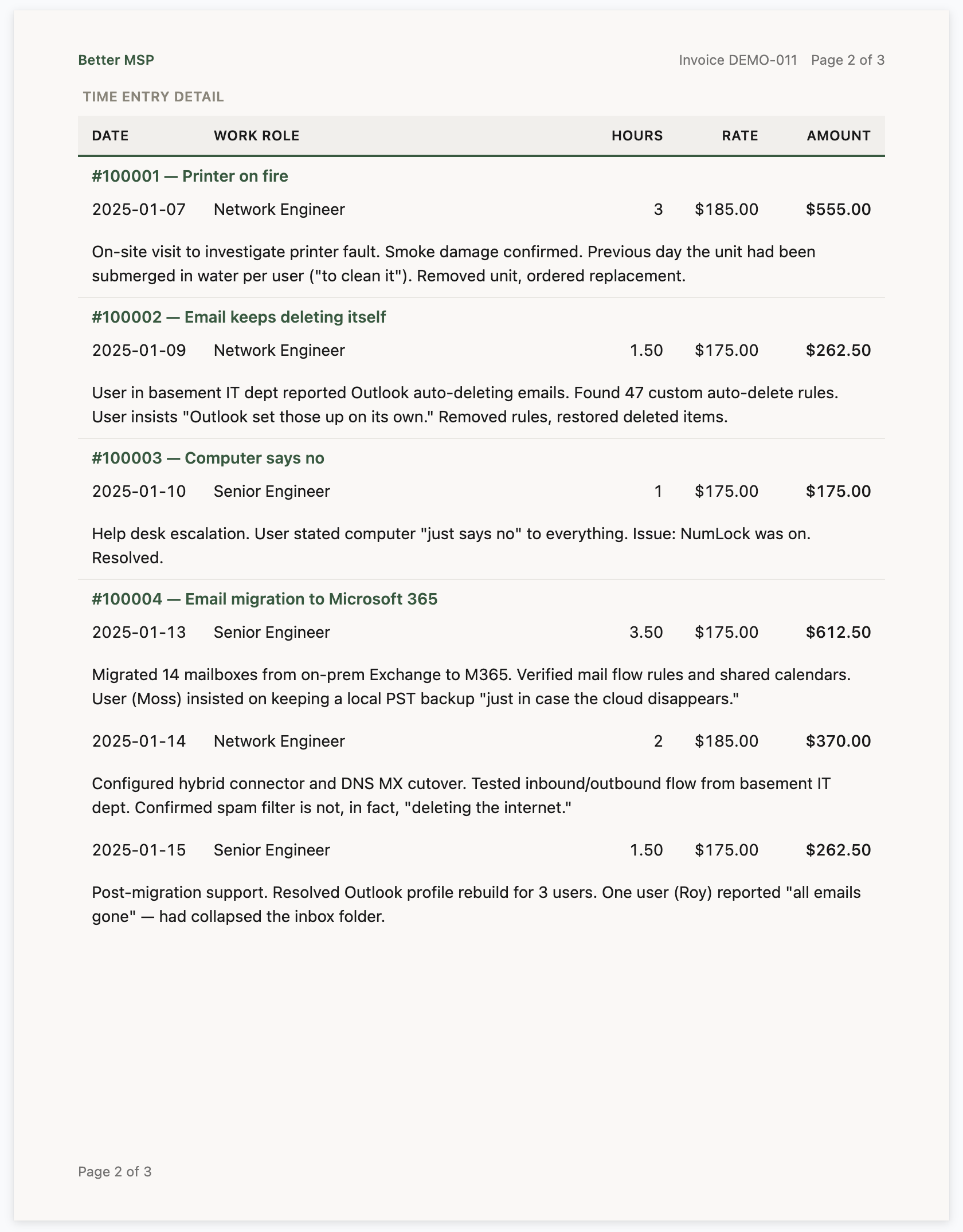
One camp wants every entry line-itemized. Ticket numbers, technician names, start and stop times, notes, billable flags — the works. If the client asks “what did I pay for?”, the invoice answers it.
The other camp wants a clean summary. A few rows of aggregated hours, a total, and a dedicated contact for questions. Anything more invites nitpicking, dispute cycles, and six-email threads about whether a 0.25-hour entry should have been 0.1.
Both camps are right. They’re just billing different kinds of clients, under different kinds of agreements, and neither approach generalizes. The honest answer is that the invoice should look different depending on who’s reading it — and most MSPs don’t set it up that way because their PSA’s reporting makes it hard.
The three forces pulling on the decision
There are three things you’re trading off whenever you decide what to show. Naming them makes the decision easier:
- Transparency. Showing detail signals “we have nothing to hide” and reduces the number of surprise-invoice conversations. For hourly work in particular, clients who can see what they paid for tend to pay faster.
- Simplicity. A cluttered invoice reads as a bill with something to prove. For flat-rate relationships where the client has already agreed to a number, extra detail creates doubt where there wasn’t any.
- Dispute resilience. When a client does challenge an invoice, you want the evidence on the document itself — not in a PDF export that arrives two days later. Detail is armor.
These three pull in different directions. Transparency and dispute resilience both want more detail. Simplicity wants less. The right answer depends on which force matters most for that specific invoice, and it changes line by line — not client by client.
What MSPs typically get wrong
A few patterns show up over and over:
Showing technician names on agreement work. If the client has a flat monthly fee, they do not need to see that “Jamie” spent 2.5 hours on their ticket. All it does is invite a conversation about whether Jamie should have been faster, or why it wasn’t the more-senior tech. Save names for T&M and project work where the labor mix is genuinely the product.
Showing hourly rates on fixed-fee work. This one sneaks in because the PSA defaults to it. A fixed-fee line with an hourly rate column is a standing invitation for the client to multiply it out and ask why they’re not being billed the smaller number. Hide the rate. Show the agreed amount.
Hiding detail on T&M and then arguing about it over email. If you bill hourly, the invoice is your argument. Making the client request a detail export every month trains them to treat your invoicing as opaque. They will eventually ask for a discount, and you’ll have no document to point to.
Showing raw ticket summaries without editing. Internal ticket titles often sound worse than the work was. “Can’t print again — reset queue” reads fine inside the ticket but reads like a pattern of failures on an invoice. Either clean up the summaries before they ship, or show a cleaned-up notes field instead.
One invoice template for every client. The clearest tell that an MSP has never thought about this is that T&M, project, fixed-fee, and agreement invoices all look identical. They shouldn’t.
How to decide, by agreement type
The cleanest decision framework is by agreement type, not by client. The same client can be on an agreement and get billed T&M for out-of-scope work in the same month, and those two invoices should not look the same.
Time-and-materials (T&M). Show everything. Dates, hours, rates, extended amounts, technician names, ticket numbers, notes. The invoice is the proof of work. If you skip detail here, you are making yourself harder to pay.
Project work. Show hours and summarized notes per phase or milestone. Hide ticket numbers (clients don’t care which internal ticket a phase rolled up from) and hide individual technician names unless the client specifically asked for them. Rates are a judgment call — showing them reinforces that you’re tracking against the estimate, but if the project is a fixed bid, hide them entirely.
Fixed fee. Show the line item and the amount. Hide hours, rates, and extended amounts. This is the whole point of a fixed fee: the client agreed to a number, not a labor breakdown. If they want a labor breakdown, they wanted T&M.
Agreement / recurring. Show the agreement name, the period, and the amount. Time entries against the agreement should be aggregated into a single summary row at most — and for most clients, not shown at all. If a client wants to see what their managed-services fee covered, that’s a quarterly-business-review conversation, not an invoice conversation.
How to decide, by client tier
Inside each agreement type, you can tune further. Larger clients with AP departments and three-way matching want consistency above all — the same invoice layout, the same totals, every month. Detail is fine for them, as long as it doesn’t change format. Smaller clients who are writing the check themselves want clarity: a headline number, a one-line explanation, and not much else.
If you work with a lot of SMB clients, a useful rule of thumb is: the detail should answer the question they’re already asking. For a small client on an agreement, that’s “am I getting value?” — answered by a simple period and amount. For a T&M client, it’s “what did you do?” — answered by detail.
How to decide, by invoice line
The final cut is the one most MSPs miss: even within one invoice, different lines can show different detail. An invoice with an agreement line and a T&M line for out-of-scope work should show zero hours on the agreement line and full detail on the T&M line. The client’s eye goes exactly where it should.
The logic: the more the price is in dispute, the more detail the line needs. Agreement lines are not in dispute (the client signed the agreement). T&M lines always are, even when the client doesn’t say so out loud.
Work type merging: the one simplification almost everyone should use
One category of simplification is near-universally helpful: consolidating related work types. If your technicians log under Remote, Onsite, Travel, and Communications for the same ticket, the client does not need to see those split into four rows. Most clients don’t need to know that 0.5 hours of a 2-hour visit was travel. They want to see a clean summary they can reconcile.
Keep the granular logging internally — it matters for your own reporting and for understanding where your techs spend time. Just merge it for the client’s view. This is simplification without losing dispute resilience: the detail still exists, it’s just not on the invoice by default.
Where Better Invoice fits in
This article is about the decision, not the tooling. But the decision is only useful if your invoicing system lets you act on it.
Better Invoice splits time display into two layers — a services summary on the main invoice page and a dedicated time detail page — and lets you configure each independently for four invoice types (standard, fixed fee, project, agreement). Thirteen independent toggles control what shows on the detail page (dates, notes, ticket numbers, hours, rates, members, work roles, work types, billable flags, extended amounts, subtotals, and more). Every column header is editable. Work type merging is a single toggle with a picker for which types to consolidate.
In practice, that means you can build the four-template setup this article describes — full detail on T&M, clean summary on fixed fee, aggregated period on agreements, phase-level detail on projects — without writing a line of report code.
For the full reference on which toggles do what, see Time Entry Detail Settings Reference.
The one-line version
Show the detail that answers the question the client is already asking. Hide the rest. And stop trying to make it work with either a pile of separate invoice templates or a single static template stretched across four very different kinds of work — use one template that auto-customizes to the billing context.
Frequently asked questions
Should MSPs show time entries on invoices?
For T&M work, yes — clients expect itemized time for billable hours. For flat-fee managed services, showing time entries invites hour-counting arguments and undermines the value pricing model. Default to summaries for agreements, detail for projects.
How detailed should time entries be on an MSP invoice?
Enough to be defensible, not so much it reads like an audit log. One line per ticket or project milestone with date, tech, hours, and a plain-English description works better than minute-by-minute entries.