Article
What MSPs Put on ConnectWise Invoices Beyond Line Items
The context MSPs add to ConnectWise invoices to reduce disputes and reinforce value — company details, contract terms, SLA proof, documentation links, and more.
Most ConnectWise invoice disputes aren’t about the line items. They’re about the context around the line items — or the lack of it.
A client opens an invoice, sees “Managed Services — $4,200,” and has to remember what happened last month to feel good about paying it. If they can’t, the invoice sits in accounts payable a few extra weeks. If they can’t twice in a row, someone starts shopping.
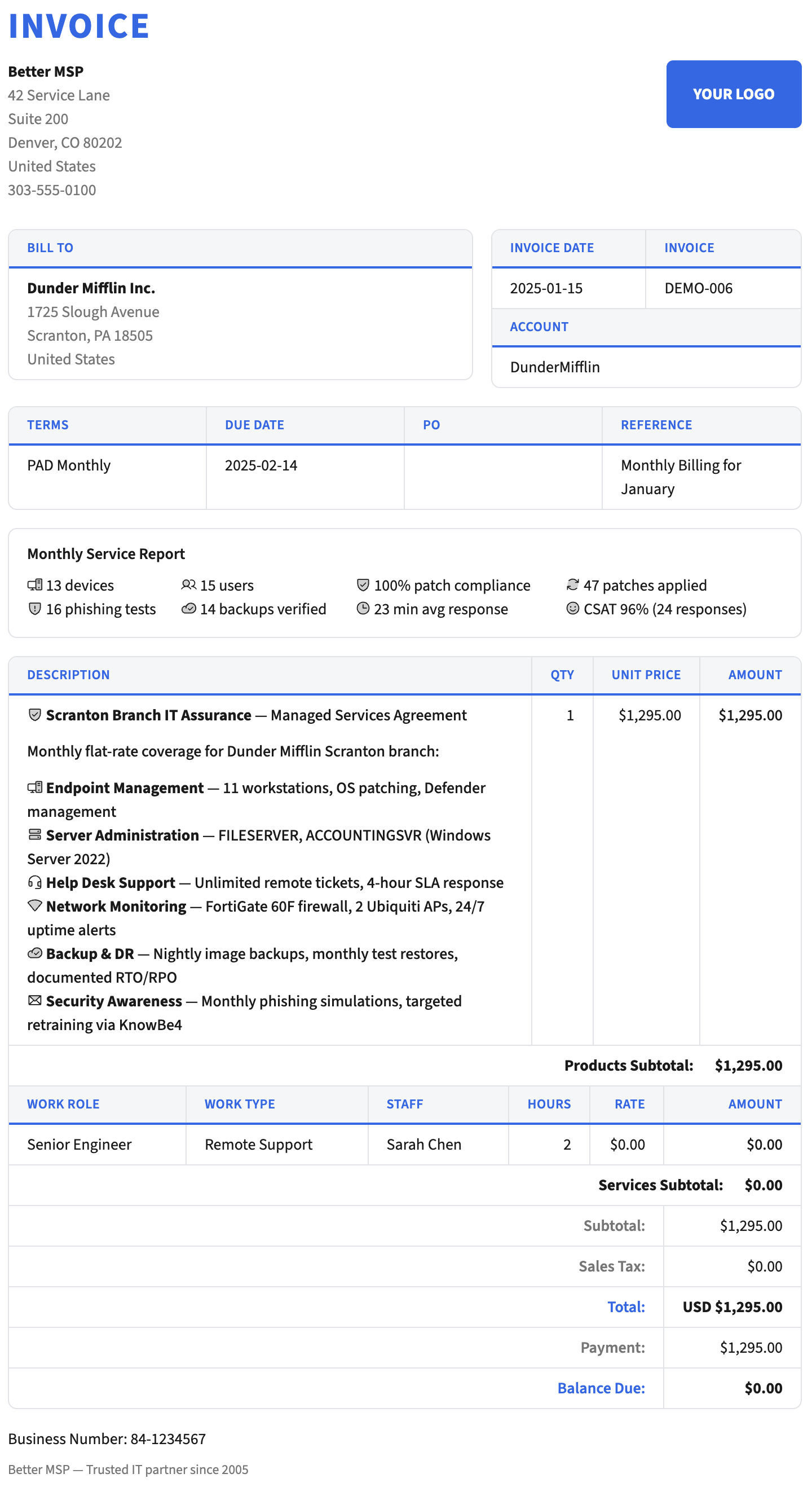
The MSPs who bill the cleanest aren’t sending simpler invoices. They’re sending invoices packed with the right context — the kind that answers “what did we actually get this month?” before the client has to ask. Most of that context already exists in the systems you run your MSP on. It just has no way to land on the invoice.
This article covers the categories of extra data MSPs most commonly put on ConnectWise invoices, why each one pays off, and where the data typically comes from. For the step-by-step of pulling that data into a Better Invoice template, see Configure a Data Source.
Company and billing context
The easiest wins come from information already sitting in the ConnectWise company record.
- Billing contact and email on the invoice header, not just the company name. AP teams route invoices faster when the billing contact’s name is printed on the page.
- Service address separate from the billing address. Multi-location clients need to see which site the work covered, especially for project and T&M billing.
- Alternate billing company name. Common for clients who’ve rebranded, been acquired, or bill through a holding company. Printing “Invoice To: Legal Entity Name” instead of the ConnectWise display name prevents rejection in large AP workflows.
- Purchase order number from the finance record. Mandatory for enterprise-side clients; often required to even submit the invoice.
- Tax IDs and registration numbers. Requirements vary by jurisdiction — pulling them from a custom finance field keeps you compliant without hardcoding. In the EU, jurisdiction can dictate the invoice format too: see Factur-X and ZUGFeRD e-invoices for ConnectWise Manage.
Most of this lives in two places in ConnectWise Manage: the Company Details record and the Finance tab on the company. Both are exposed as built-in data sources in Better Invoice, so no external integration is needed.
Agreement and contract context
ConnectWise invoices by default tell the client what they bought. They rarely tell the client what they’re entitled to under their agreement. That gap creates scope-creep arguments.
Invoicing the contract context alongside the charges pre-empts those conversations:
- Agreement name and renewal date. “This is billed under your Managed IT Services agreement, renews 2026-09-30.”
- Covered hours and consumed hours. If the agreement includes a block of monthly hours, the invoice is the right place to remind the client how much they’ve used. Highlighting near-exhaustion is a better renewal conversation than a surprise overage line item.
- Included services summary. A brief “What’s included this month” block — remote monitoring, patch management, backup verification — so the client reconnects the monthly fee to the ongoing work.
- Excluded scope. If you’ve carved out specific services (e.g., “on-site work billed separately at T&M rates”), repeating that on the invoice prevents “I thought this was included” pushback on the next project.
Contract context usually requires custom fields on the agreement or a lookup to an agreement addendum system. Most MSPs pull it with a custom endpoint that queries ConnectWise’s agreement API, then returns only the fields the invoice needs.
Documentation and asset context
This is the category where the “smart” invoices live — and it’s what clients remember.
MSPs running IT Glue or Hudu have a full picture of what the client owns, what’s deployed, and what’s being protected. Almost none of it ends up on the invoice, even though it’s often the strongest evidence of value.
- Configuration counts. “Managing 47 workstations, 12 servers, 3 network devices, 89 Microsoft 365 mailboxes.” Clients forget how much surface area you’re covering.
- Backup and recovery stats. Last successful backup timestamp per critical system. Number of restorable recovery points. Verification status. This is often the single most effective thing to put on a managed backup line item.
- Security posture metrics. MFA enrollment rate, patch compliance percentage, endpoint protection status. These are the numbers your QBRs already show — putting the current snapshot on each invoice means the client sees them 12 times a year instead of 4.
- Contract and warranty expiration alerts. “3 workstations out of warranty as of Q3” prints a sales conversation onto the invoice, no cold outreach needed.
This data usually doesn’t live in ConnectWise. Pulling it onto invoices requires bridging the client’s company record in ConnectWise to their organization in IT Glue or Hudu, then querying the documentation system’s API. Tools like n8n, Zapier, or a simple custom webhook handle the mapping and return the specific fields Better Invoice needs for the template.
Delivered-value context (metrics, SLA proof)
This is the category most MSPs underuse — partly because the data is scattered, partly because most invoice systems can’t display it even if you have it.
The question to answer on the invoice: what did we do for this client this month that they probably didn’t notice?
- Tickets closed. Total count, broken out by type (incidents, requests, projects). Even the raw count reminds the client you’re doing work they never see.
- Response and resolution SLA compliance. “97% of tickets met first-response SLA this month.” If you hit the target, print it — it’s the cleanest possible justification for the fee.
- Hours worked without a ticket charge. Proactive work, monitoring-driven fixes, capacity tuning. Invisible labor that keeps clients from having problems.
- Incidents prevented by automation. Patches applied, threats blocked, auto-remediated alerts. The marketing-speak version reads as fluff; the specific numbers read as proof.
Most of these come from the ticket system (ConnectWise itself) plus RMM and security tools. A custom endpoint that aggregates across sources — often orchestrated in n8n — and returns a clean JSON summary keyed by company ID is the common pattern.
Cross-system links
For power-user clients and internal AP reference, invoices can also carry direct links:
- Client portal links to view tickets in detail, approve change requests, or download prior statements.
- Documentation links back to IT Glue / Hudu client portals for clients who’ve been granted access.
- Signed agreement links stored in your contract management system.
- Internal reference links for your own team — the ConnectWise agreement URL, the IT Glue org URL — embedded as accountant-only links or printed only on the internal copy.
Links keep the invoice itself terse while making everything one click away. They’re cheap to add and disproportionately useful when an invoice triggers a question.
Why this gets harder than it should
The reason most MSPs don’t do any of this isn’t that they haven’t thought of it. It’s that ConnectWise’s built-in invoice template system can only show what’s in the ConnectWise database, and only through Report Writer expressions. Pulling in IT Glue data, or RMM metrics, or custom aggregates means writing SQL-style joins against data that often isn’t even in ConnectWise.
Even the stuff that is in ConnectWise — custom finance fields, agreement custom fields — can be painful to get onto an invoice because Report Writer stores all custom fields as varchar and requires manual type casting. (Report Writer’s broader limitations are covered in Replacing Report Writer for ConnectWise Invoices.)
Better Invoice makes this easier by treating any HTTPS endpoint as a first-class data source. The template author provides a URL that returns JSON; Better Invoice fetches it for each invoice render and exposes the result to the template. That turns every API you already use — ConnectWise itself, IT Glue, Hudu, RMM, security tools, spreadsheet exports, in-house services — into potential invoice data.
The practical setup is covered in Configure a Data Source, including the n8n pattern most MSPs use to bridge ConnectWise company IDs to their other systems.
How to decide what to add
A short test for any piece of data you’re considering putting on the invoice:
- Would seeing this change how the client feels about paying? If yes, it’s a candidate.
- Does it answer a recurring question your AM or owner fields the week after sending invoices? If yes, putting it on the invoice is cheaper than answering the question.
- Is it evidence, not filler? A number or a status beats a paragraph of marketing. “2,847 patches applied” lands; “we work hard to keep you secure” doesn’t.
- Is it always true, or does it need conditionals? Data that applies to some clients but not others needs
{% if %}blocks — plan for that in your template.
The MSPs with the best invoices aren’t the ones with the most data on them. They’re the ones whose invoices carry exactly the context their specific client base cares about — and nothing else.
Frequently asked questions
What should an MSP invoice include besides line items?
Beyond line items, strong MSP invoices include a service period summary, ticket counts resolved that month, agreement coverage details, time-on-site summaries, device counts, and a client-friendly description of work performed. These turn the invoice into a monthly value statement.
Should MSP invoices show individual ticket details?
Show grouped summaries, not every ticket. Clients rarely read a 40-row ticket dump but they do respond to 'resolved 23 tickets, avg 2hr response, 2 on-site visits.' Keep the granular data available as an appendix or linked report.
Do ConnectWise invoices support custom fields?
Default invoice formats don't render custom fields from agreements or companies. A template-based invoice tool can pull any ConnectWise field — including UDFs and custom agreement properties — into the rendered PDF.