Article
Customizing ConnectWise Invoice Templates
A complete guide to your ConnectWise Manage invoice customization options — built-in templates, Invoice Groups, Report Writer, and Better Invoice.
ConnectWise Manage gives you several ways to customize invoices, each with different trade-offs. This guide covers all of them so you can decide which approach fits your needs.
Built-in invoice templates
ConnectWise Manage ships with a handful of default invoice templates. You can select which template to use per invoice type (agreement, time and materials, project, etc.) in Setup Tables > Billing > Invoice Templates.
What you can control with the built-in templates:
- Which template is assigned to each invoice type
- Time entry detail level — Standard, Summary, or Detail
- Whether covered items appear on agreement invoices
- Basic column visibility
What you cannot control:
- Layout, fonts, or colors
- Line item formatting or grouping
- Conditional logic based on invoice type
- Custom fields on the invoice
The built-in templates are functional but generic. Every MSP using them sends the same invoice.
Invoice Groups
Invoice Groups let you bundle multiple agreement additions into a single line on the invoice. This is a native ConnectWise Manage feature, not a template change.
To set up an Invoice Group:
- Go to Procurement > Product Catalog.
- Select Invoice Group.
- Create a group with a name and description your client will see.
- Clear Show Items if you want to hide the individual additions and show only the group total.
- Assign additions to the group on each agreement.
Invoice Groups solve the most common client complaint: too many line items. Instead of 15 individual additions, the client sees “Managed IT Services — $X/month.”
The limitations:
- Invoice Groups only apply to agreement additions. You cannot group time entries, project charges, or product purchases.
- You still cannot control the overall look of the invoice — fonts, colors, layout, and branding remain locked to the built-in template.
Report Writer
Report Writer is ConnectWise Manage’s tool for building fully custom invoice templates. It gives you complete control over layout, data, and formatting. It is also the most technically demanding option.
Report Writer requires:
- HTML and CSS for layout and styling
- Understanding of ConnectWise’s repeater syntax for grouped data
- SQL-style queries and joins to pull the right data sources
- Manual type casting for custom fields (ConnectWise stores all custom fields as
varcharregardless of the type you selected)
Common issues with Report Writer:
- Performance. Custom templates take 20 to 40 seconds to generate a PDF on cloud-hosted instances. Built-in templates take 3 to 4 seconds.
- Documentation. ConnectWise’s docs use three different repeater syntax formats interchangeably. Only two of them work. The subtotal decorator is documented as both
@Subtotaland#Subtotal, and column names with spaces or underscores cause silent failures. - Stability. Report Writer frequently fails to load, particularly outside business hours. ConnectWise platform updates have broken existing custom templates without warning.
- Support. ConnectWise support covers defects in Report Writer itself but does not help with building or debugging custom templates.
Report Writer is a viable option if you have developer resources and are willing to invest the time. For a detailed breakdown of its limitations, see Replacing Report Writer for ConnectWise Invoices.
Better Invoice
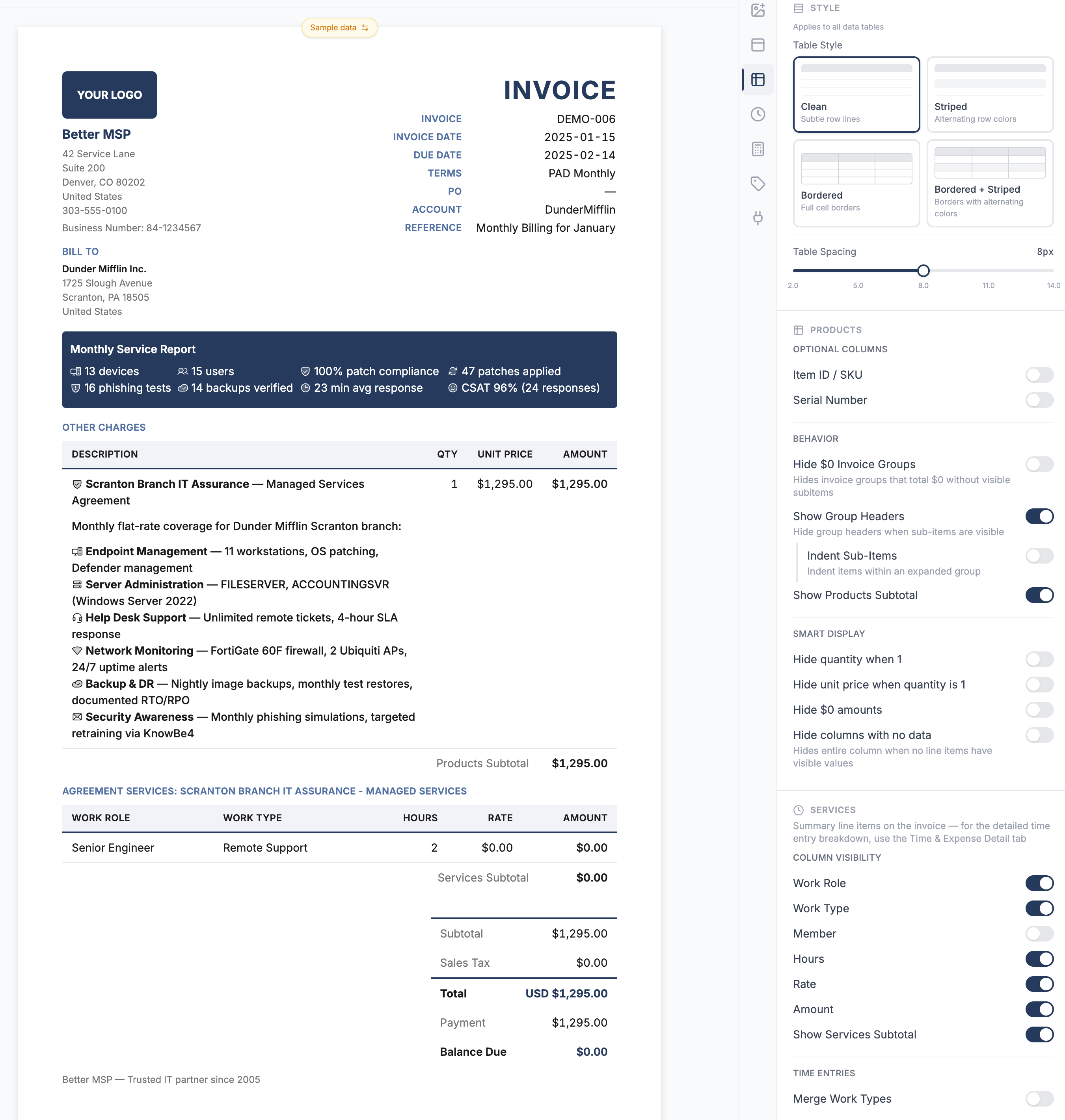
Better Invoice replaces the ConnectWise Manage invoice template engine entirely. Instead of building templates in Report Writer, you configure your invoices through a visual interface with 150+ settings.
What Better Invoice gives you:
- Full branding. Your logo, your colors, your fonts. Match your invoices to your brand in minutes.
- Per-type control. Different settings for agreement, time and materials, and project invoices. Each type gets its own visibility, columns, and detail level.
- Line item control. Hide zero-dollar additions, internal line items, and GL pass-throughs from the client view while preserving them for your reporting.
- Time entry formatting. Control exactly how time entries appear — summarized, detailed, grouped by ticket, or hidden entirely.
- Markdown and icons. Rich formatting in descriptions and notes. Thousands of icons to label services visually.
- Custom data sources. Pull SLA metrics, asset data, or anything from external APIs directly onto the invoice.
- Sub-second rendering. Fully custom, print-ready PDFs generated in under one second.
- No code required. Every plan is visual settings only. On the Custom plan, anything the settings don’t cover becomes an extension we build for you — you describe the behavior, we ship it and switch it on.
To get started with Better Invoice, see Connect Better Invoice to ConnectWise PSA. For a detailed comparison with other third-party solutions, see ConnectWise Invoice Template Alternatives.
Frequently asked questions
Can you customize invoice templates in ConnectWise Manage?
Natively, customization is limited to the default invoice formats in Setup Tables > Invoicing. For real branding — custom logos, colors, grouped line items, or per-client layouts — you need Report Writer or a third-party invoice tool.
How do I add my logo to a ConnectWise invoice?
Upload the logo under Setup Tables > Company Info. ConnectWise stamps it at the top of the default invoice. For control over size, placement, or per-entity logos (multiple business units), use a custom template engine.