Underneath the 150+ settings, every Better Invoice template is code. The template editor gives you direct access to it: HTML and CSS, live preview, version history, and no limits on what you can change.
Access is by request. The editor isn’t enabled by default, and most MSPs never need it. Almost everything MSPs ask for turns out to be either a setting or a custom extension we build and switch on for you. If you’d rather work in the code yourself, contact us to request access on the Custom plan.
Do you actually need it?
Start here, because the answer is usually no.
- Changing what the invoice shows. Line-item detail, rollups, hidden items, branding, fonts, colors. All of that is a setting. See Set Up Custom Invoice Templates.
- Changing how the invoice is structured. New sections, different groupings, reshaped line items. Describe it and we build it as a custom extension. You don’t write anything, and it keeps working when ConnectWise changes underneath it.
- Maintaining the template yourself, in code. That’s what the editor is for, and it’s the right answer if you have someone in-house who wants to own the markup.
The tradeoff is ownership. Once you’re editing template code directly, that template is yours to maintain.
Edit code. See the invoice. Instantly.
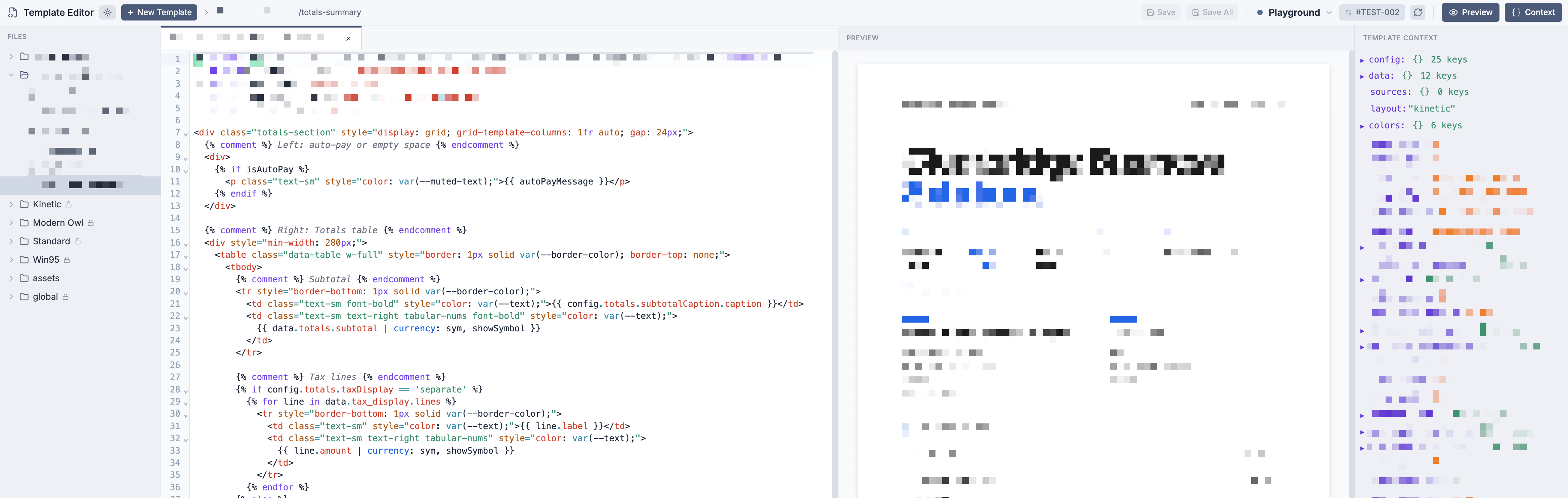
Your template code lives on the left. The rendered invoice updates on the right every time you save. A third pane shows every variable available to your template — select any value to copy its expression straight into your code.
Everything is a file. Everything is yours.
Templates, styles, HTML structure, images, logos — your entire layout is a file tree you control. Create, rename, delete, and organize files however you want. Drag and drop assets directly into the editor. No widget builders, no artificial limits.
Every save is a version. Nothing is ever lost.
Every file save creates a new version. Open the history for any file, diff two versions side by side, and restore a previous version with one click. Experiment freely — you can always go back.
It’s a real code editor.
Syntax highlighting, multi-file tabs, code folding, light and dark themes. The editing experience you’d expect from a desktop IDE.
Duplicate a layout. Make it yours.
Start from any built-in layout and duplicate it. Every template, every style, every asset is cloned into your own layout that you can modify freely. Rename it, reshape it, make it unrecognizable.
Request access
The editor is available on the Custom plan by request. Contact us and tell us what you’re trying to build — if it’s something we can ship as an extension instead, we’ll usually just do that for you.