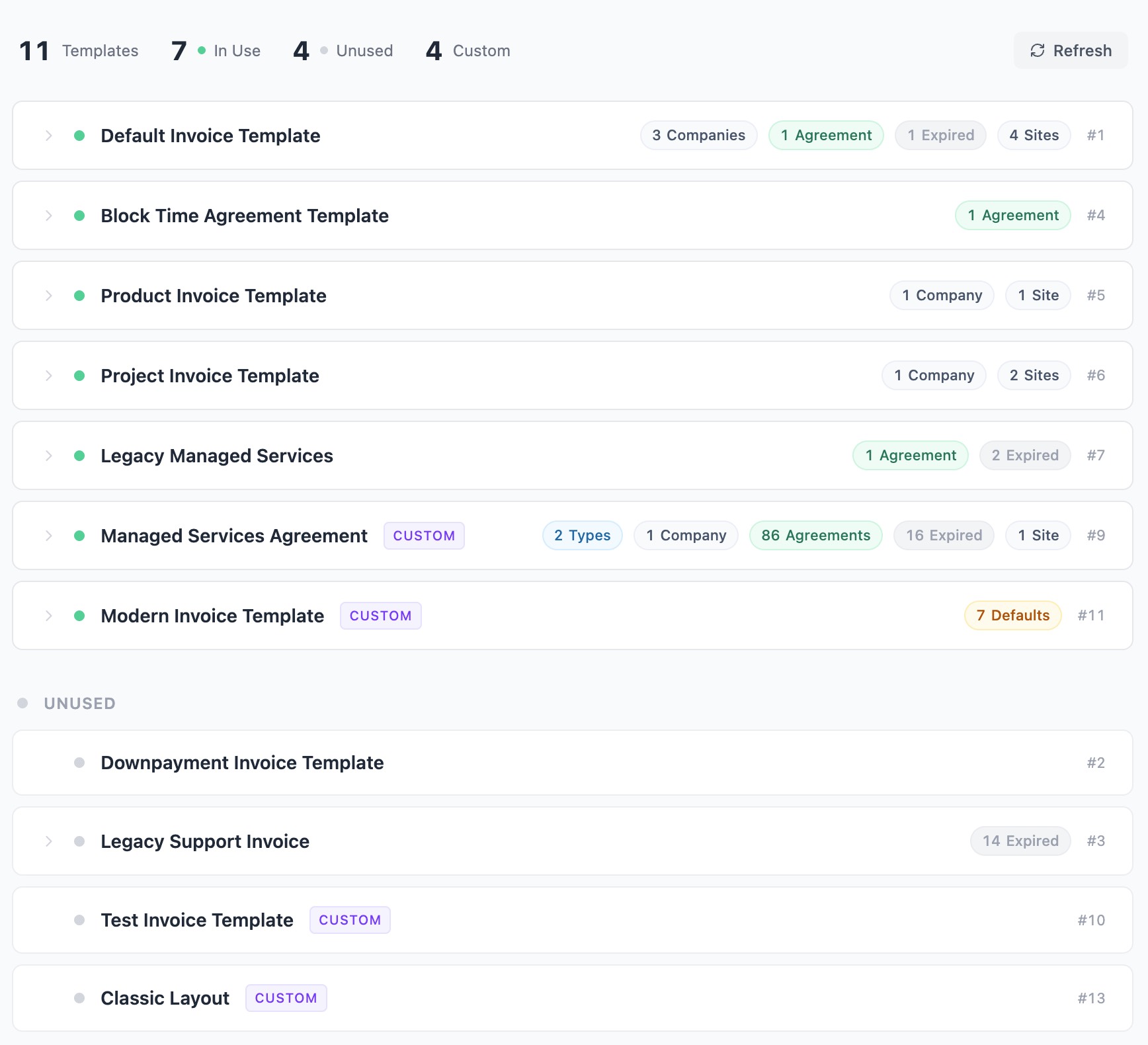
Need a report of which ConnectWise Manage invoice templates are in use? Better Invoice generates one instantly — no Report Writer, no SQL queries, no consultant fees. Just sign up for a free account, connect to ConnectWise, and the report is ready.
MSPs accumulate invoice templates over time. Billing setups, agreement types, companies, and individual agreements can all have different templates assigned. ConnectWise Manage has no built-in way to see the full picture — which templates are active, which are unused, and where each one is configured. Building this report in Report Writer means joining multiple database tables and writing custom expressions. Better Invoice replaces all of that with a live, always-current view.
Sign up free and run your first template usage report in under two minutes.
Run your invoice template report
- In Better Invoice, go to Settings > Template Usage.
The report pulls your invoice template data live from ConnectWise PSA and displays a summary with a per-template breakdown. Unlike a Report Writer report, it stays current automatically — no need to re-run queries or maintain custom expressions.
Summary
The top of the page shows four counts:
- Total — the number of invoice templates in your ConnectWise instance, including standard and custom templates.
- In Use — templates assigned to at least one billing setup, agreement type, company, agreement, or site.
- Unused — templates not assigned anywhere. These are candidates for cleanup.
- Custom — templates using a Custom URL Link (Report Writer or external templates like Better Invoice).
Per-template breakdown
Each template is listed as a card with a status indicator — green for in use, gray for unused. Custom templates are labeled with a badge.
Select a template to expand its details. The breakdown shows every place the template is assigned:
Billing defaults
Shows which billing setup locations use the template, and in which slot. ConnectWise billing setups have nine template slots: default, standard actual, standard fixed, progress, agreement, credit memo, down payment, miscellaneous, and sales order. This section tells you which slots reference the template and at which location.
Agreement types
Lists agreement types configured to use the template. If you change an agreement type’s template, all agreements of that type inherit the change unless they have a company-level or agreement-level override.
Companies
Shows companies with a direct template override. Company-level overrides take precedence over the billing setup default and agreement type setting.
Agreements
Lists individual agreements using the template. Active and expired agreements are shown separately — expired agreements are collapsed by default so you can focus on what is current. Each agreement shows its name, company, and agreement type.
Sites
Shows company sites with a template override. Site-level overrides are the most specific — they take precedence over company, agreement type, and billing setup defaults.
Why this replaces a Report Writer report
Building this report in ConnectWise Report Writer means creating an advanced query and joining multiple database tables. You don’t need to learn Report Writer to get this information.
Better Invoice gives you the same data — and more — for free. The report updates live, covers all assignment levels (not just invoices that have been sent), and requires no SQL or Report Writer knowledge.
Common uses
Consolidate templates before a migration
In Report Writer, MSPs typically need separate templates for each invoice type — one for standard invoices, one for fixed fee, one for agreements, one for progress billing. Better Invoice handles all of these with a single template. It detects the invoice type automatically and adjusts the layout. Use the template usage report to see how many templates you currently have assigned across billing setups and agreement types, then point them all to your one Better Invoice template.
Clean up unused invoice templates
Templates with no assignments anywhere are safe to remove from ConnectWise. The unused count tells you how many there are, and the gray status indicator makes them easy to spot.
Audit template assignments after a change
After changing a billing setup default or agreement type template, use this report to verify the change took effect and that no overrides at the company, agreement, or site level are still pointing to the old template.
Understand the ConnectWise template hierarchy
ConnectWise applies invoice templates in a specific order of precedence: site overrides company, company overrides agreement type, and agreement type overrides the billing setup default. The template usage breakdown shows all four levels for each template, so you can trace exactly why a particular invoice renders with a particular template.
Get your template report free
The template usage report is included in every Better Invoice account, including the free tier. Sign up free — connect to ConnectWise Manage and see your full template report in under two minutes.