ConnectWise Manage lets you add custom links to records like invoices, tickets, and companies. By adding a link to the Invoice table, you can open any invoice directly in Better Invoice with one selection — no need to copy invoice numbers or navigate manually.
Add a custom link
-
In ConnectWise PSA, go to System > Setup Tables > Links.
-
Select the + button to create a new link.
-
Enter the following fields:
-
Link Name — Enter Better Invoice.
-
Table Reference — Select Invoice.
-
Link Definition — Enter the following URL:
https://app.betterinvoice.io/go/invoice/[invnumber]ConnectWise Manage substitutes
[invnumber]with the actual invoice number at runtime.
-
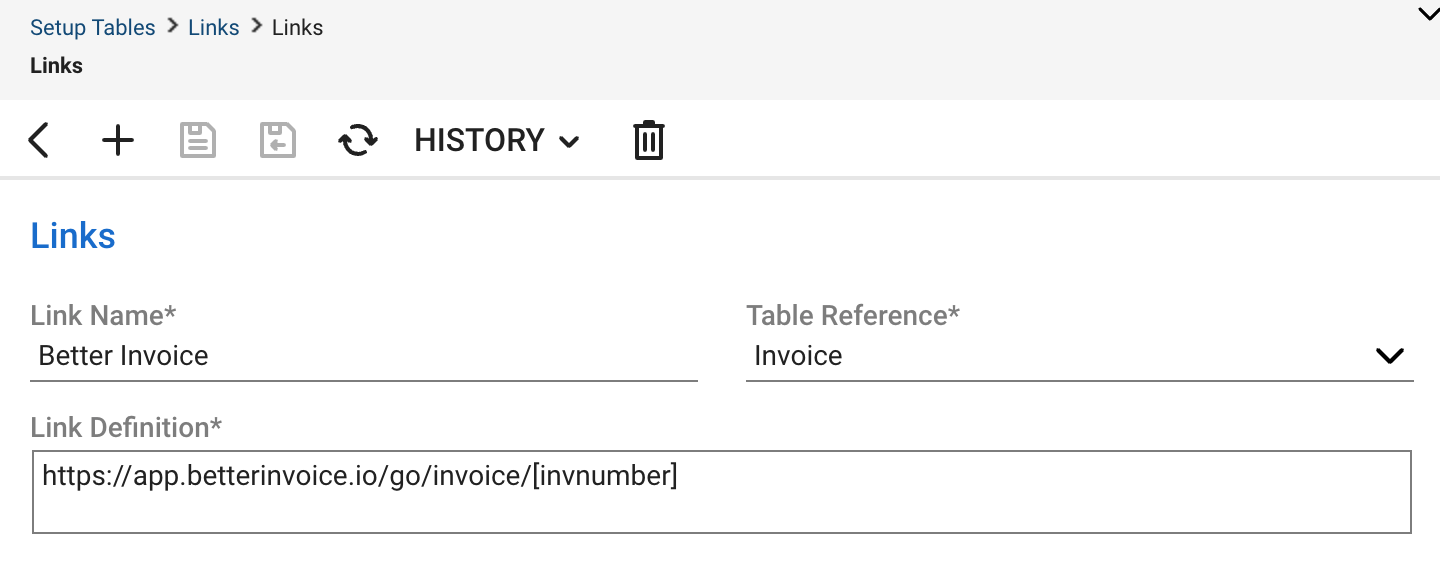
- Select Save.
Use the link
Once saved, the Better Invoice link appears on any invoice record in ConnectWise Manage. To open an invoice in Better Invoice:
-
Open an invoice in ConnectWise Manage.
-
Select the Links menu on the invoice record.
-
Select Better Invoice.
The invoice opens in Better Invoice in a new browser tab.