Activity Timeline and Invoice Audit Trail
The invoice audit trail is the Activity timeline on every invoice in Better Invoice review — a single chronological record of who changed what, when, across both Better Invoice and ConnectWise PSA. Every comment, approval, status change, reviewer edit, and relevant ConnectWise Manage audit event lands in one feed, so you can answer “who touched this and why” without leaving the invoice.
This is the modern alternative to chasing changes through ConnectWise Invoice Routing records and separate CW audit screens. Better Invoice even seeds its reviewers from a CW invoice’s existing Invoice Routing list, then captures every action that follows in one timeline. For an overview of the review workflow, see What is invoice review.
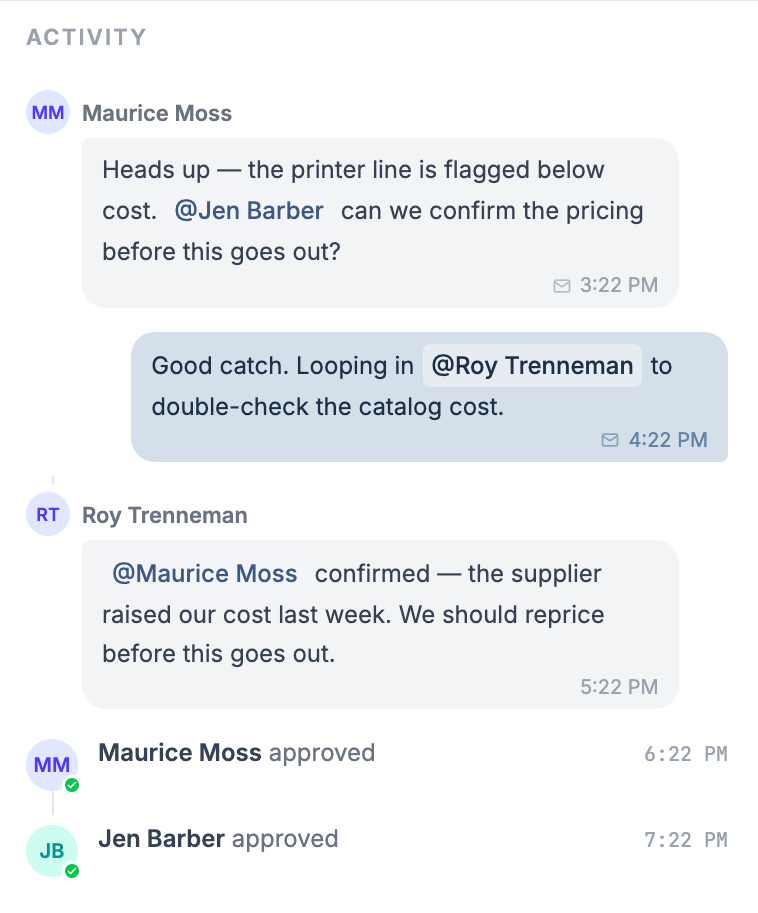
What appears in the activity timeline
The feed is built from two sources: internal Better Invoice events and woven-in ConnectWise audit events. The Activity section header sits above the feed; when there is nothing yet, it reads “No activity yet.”
Internal events read in plain language:
- commented — someone posted a comment.
- approved — a reviewer approved the invoice.
- undid their approval — a reviewer reverted their approval to pending.
- rejected — a reviewer rejected the invoice.
- changed status → {status} — the invoice status was changed.
- removed {name} — a reviewer was removed from the invoice.
Each item shows the actor’s name, the verb phrase, and a timestamp. Approvals and rejections carry a small status badge on the actor’s avatar so you can scan outcomes at a glance.
How comment bubbles read
Comments render as chat-style bubbles so the conversation stays readable inside the audit trail.
- Your own comments appear right-aligned in an accent color.
- Other people’s comments appear left-aligned in gray.
- @mentions inside a comment render as styled chips with the member’s name.
Two labels tell you how a comment reached people beyond the timeline:
- Also sent via email — the comment was emailed to mentioned members.
- Posted via share link — a guest posted the comment through a share link, without a Better Invoice account.
Because guest actions are attributed and stamped just like signed-in ones, the audit trail stays complete even when an external reviewer never logs in. See Reviewers and approvals for how those decisions are recorded.
Which ConnectWise audit events are woven in
Better Invoice pulls the ConnectWise Manage audit trail for the invoice and merges the relevant entries into the same timeline, marked with the ConnectWise logo. To keep the feed signal-rich, only a curated set of CW audit types is shown:
- Invoice
- Billing Status
- Payment
- Credit
- Product
- Date
- Billing Information
Some entries are deliberately filtered out so the trail reflects meaningful changes, not system bookkeeping:
- Invoice Total entries are hidden entirely — totals are derived, and the underlying line changes already show.
- Within Invoice events, the “closed by,” “template,” and “batch email” sub-types are excluded — these are routine processing steps, not edits worth auditing.
How ConnectWise phrasing is cleaned up
Raw CW audit text is wordy and wrapped in markup. Better Invoice strips the formatting and rewrites each entry into one of two compact forms:
- A change reads as field: old → new — enteredBy, for example
Billing Status: Open → Closed — Jane Smith. - A non-change entry reads as {cleaned text} — enteredBy.
The trailing name is the ConnectWise member who made the change, so attribution survives the merge. This means a billing-status flip made directly in ConnectWise and an approval made in Better Invoice sit side by side in the same chronological record, each labeled with who did it.
The compliance takeaway
The activity timeline gives you one defensible audit trail per invoice: every change, in order, with the actor named — whether the action happened in Better Invoice or in ConnectWise, and whether it came from a signed-in reviewer or a guest on a share link. That is the upgrade over native ConnectWise Invoice Routing, where review history is fragmented across routing records and separate audit screens.
To control what gets flagged and reviewed before sign-off, see Configure review rules and the Review rules reference. For background on building an approval workflow, read ConnectWise invoice approval workflow.