Share an Invoice for Review with Guest Reviewers
To share an invoice for review, you comment on it and @-mention the people you want to loop in. Better Invoice notifies each mentioned member. If a member has no Better Invoice account, the mention mints a scoped, per-recipient share link they can open with no login — view the review, comment, and (if assigned) approve or reject.
This is the collaboration layer that turns ConnectWise Invoice Routing into a back-and-forth conversation rather than a one-way handoff.
Better Invoice seeds each invoice’s reviewers from its existing ConnectWise Manage Invoice Routing list, so the people already on the routing are present from the first sync. See Reviewers and approvals for how assignments work.
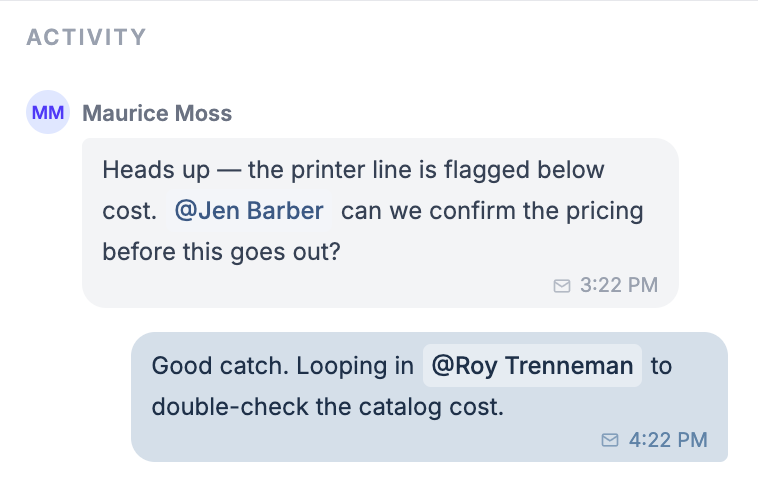
Comment and @-mention on an invoice review
The Activity feed holds the full timeline — comments, status changes, approvals, and ConnectWise audit events. Comments thread inline so the conversation stays attached to the invoice. See Activity and audit trail for the event reference.
To comment and bring someone in:
- In the comment box below the Activity feed, enter your comment.
- Enter @ to open the mention popup, then continue typing a name.
- Move up or down the list with the arrow keys, and select the member with Enter.
- Select Enter to send the comment, or Shift+Enter to add a line break.
The mention popup lists CW Manage members and Better Invoice users, and excludes anyone already assigned as a reviewer. Each selected member becomes a non-editable mention chip reading @FirstName LastName.
Choose what a mention does
When a comment has at least one mention AND you have permission to add reviewers or send emails, up to two checkboxes appear above the send action. Which ones you see depends on your permissions:
- Add mentioned members as reviewers — assigns the mentioned people to the invoice. On by default.
- Email mentioned people — sends each mentioned person an email with your comment. Off by default.
Your in-progress comment auto-saves per invoice as you type, so switching invoices or reloading the page restores the draft. Guests on a share link are the exception — their drafts are not saved.
Share an invoice for review with a guest link
When you mention a member who has a Better Invoice account, the notification email links straight to the review behind the normal sign-in. When you mention a member who has no Better Invoice account, Better Invoice mints a scoped share link instead and emails that.
A share link is a per-recipient, per-invoice URL secured by a bearer token. It does not require a login. Key behaviors:
- One link per recipient per invoice. Each mentioned member gets their own link; a second mention of the same person on the same invoice reuses the existing link.
- 90-day expiry that renews. The link expires 90 days after it is minted. Each time you re-mention that person, the expiry resets to 90 days out — so an active conversation keeps the link alive.
- Scoped to one invoice. A link grants access to exactly one invoice review, nothing else in your tenant.
The email comes from your name (via Better Invoice), with your address set as the reply-to, so the recipient can reply to you directly.
What a guest can do without a login
A guest who opens a share link sees the review — flags, reviewers, status, and the activity timeline — but never the raw ConnectWise billing data behind it. With no account, a guest can:
- View the review for that one invoice.
- Comment, including @-mentioning other members.
- Approve or reject — only if they were assigned as a reviewer on this invoice.
Approve and reject are gated on assignment. A guest who is on the invoice’s reviewer list sees the decision buttons; a guest who was only mentioned for input sees a read-only status and the comment box. This mirrors the assigned-reviewer model in Reviewers and approvals.
How guest actions are attributed and logged
Every guest action is tied back to the ConnectWise member behind the link, so the trail stays clean even though no Better Invoice user is signed in.
- Comments and decisions are recorded against the link’s
cwMemberId, with the source marked asshare_link. - In the Activity feed, a guest’s comment carries a Posted via share link label, and guest timeline events show a share-link marker — so reviewers can tell at a glance which actions came through a link.
- Every guest write is also written to the audit trail, capturing the action, the full details, and the originating IP address. See Activity and audit trail for how to read it.
When to use share links
Share links exist to bring people into the approval loop:
- An accountant or controller who needs to sign off on totals before the invoice goes out.
- An account manager or team lead whose name is already on the ConnectWise Invoice Routing but who shouldn’t have to maintain a login.
For the native ConnectWise equivalent — sequential routing and Route Forward / Backward — see Routing tab in ConnectWise Invoice Search and My Invoices.
Better Invoice review is the modern alternative: the same reviewers, plus threaded comments, mentions, and a login-free path for anyone outside CW Manage. For the wider workflow, read What is invoice review or the ConnectWise invoice approval workflow guide.